Elasticsearch Alert
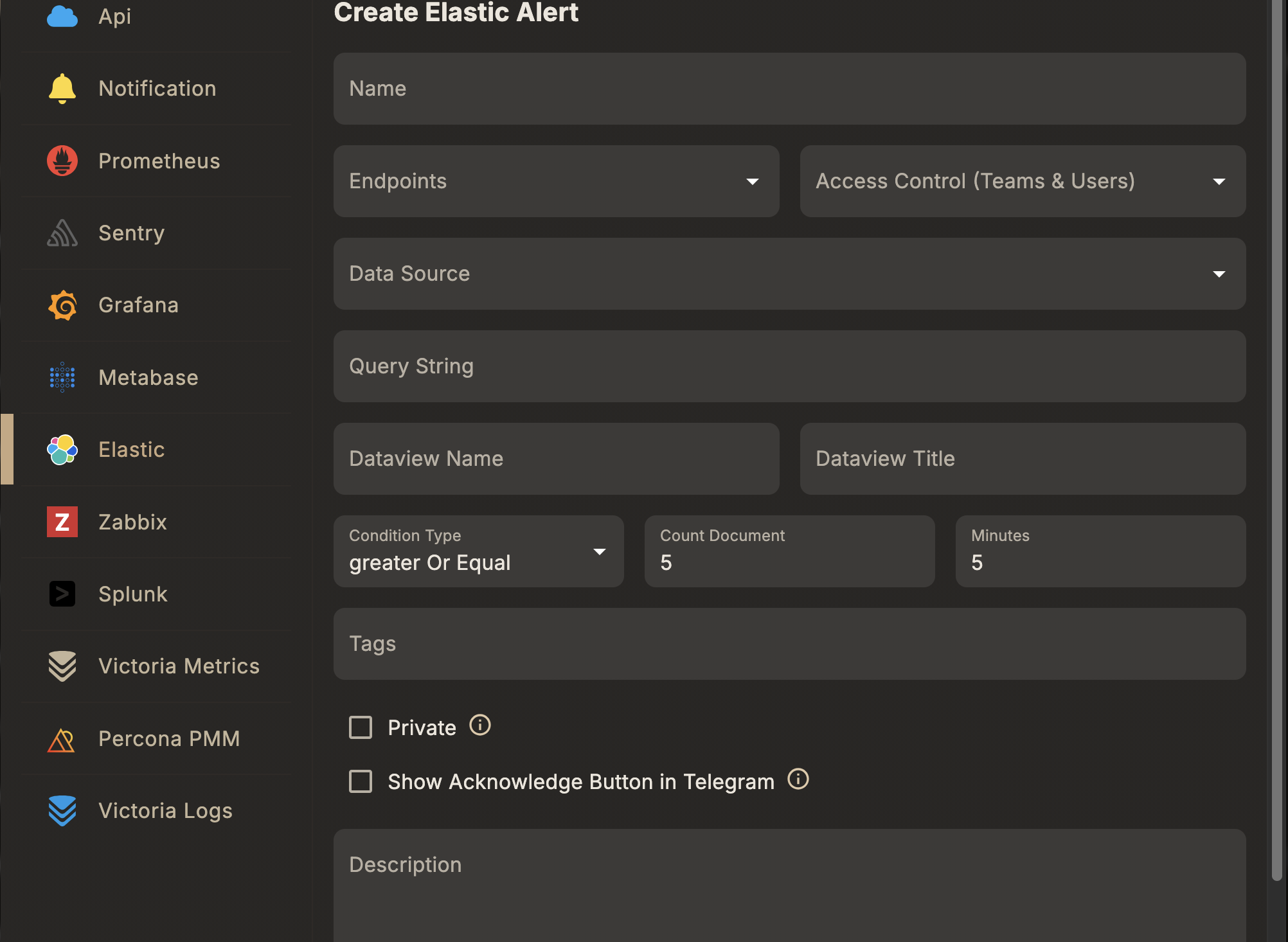
An Elastic alert rule fires a document-count threshold check on an Elastic/ELK data view — for example, alerting when the number of 5xx responses or error log lines in a window exceeds a limit. It's a different shape from the Prometheus/Grafana/PMM rules: there's no dynamic/text-query choice, and no external ingestion webhook is required — Skylogs runs the check itself against the connected Elastic data source. (Kibana alerting can also push events in via a webhook connector, see Elastic integration, if you prefer Kibana to own the rule instead.)
Before you start
- Connect an Elastic/ELK data source in Skylogs.
- Have at least one notification endpoint ready to attach.
Steps
- Select the Alert Type → Elasticsearch.
- Choose a Datasource — the connected Elastic data source.
- Choose a Data View and enter the query string to filter documents.
- Set the look-back window, condition, and document-count threshold.
- Enter a Unique Alert Name, assign Endpoints, and optionally add Tags.
Fields
| Field | Type | Description |
|---|---|---|
dataSourceId | string | Elastic data source id |
dataviewName | string | Data view name, e.g. responses |
dataviewTitle | string | Data view index pattern, e.g. responses* |
queryString | string | Filter query, e.g. OriginStatus:>=400 |
minutes | integer | Look-back window in minutes, e.g. 15 |
conditionType | string (greaterOrEqual | lessOrEqual) | How countDocument is compared against the matched document count |
countDocument | integer | Document count threshold, e.g. 5 |
Example request
{
  "type": "elastic",
  "name": "Elevated 5xx error rate",
  "description": "Fires when 5xx responses exceed threshold in a 15-minute window",
  "dataSourceId": "<elastic-datasource-id>",
  "dataviewName": "responses",
  "dataviewTitle": "responses*",
  "queryString": "OriginStatus:>=400",
  "minutes": 15,
  "conditionType": "greaterOrEqual",
  "countDocument": 5,
  "endpointIds": ["<endpoint-id>"],
  "tags": ["production", "errors"]
}
Sent to POST /api/v1/alert-rule — see the full field reference in API reference → Alert rules.
Notes
- The rule fires when the count of documents matching
queryStringwithin the lastminutessatisfiesconditionTypeagainstcountDocument. - Keep
queryStringnarrow (index pattern + filter) so the count reflects the specific condition you're watching, not the data view's full volume.